Thursday, June 2, 2016

Monday, July 14, 2014
How to download website | best program
Sometime we need browse site offline as online , by download it in your computer . There are some tools use to download whole site , some are good and other bad , here we discussing best tools or program use to download entire website .


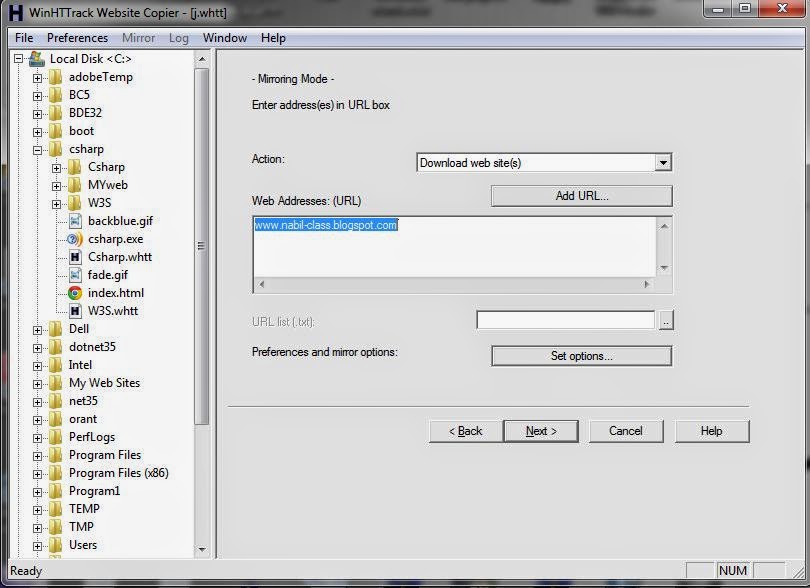

HTTrack Website Copier is program use to downloading website , it's free and easy to use . HTTrack download Html ,image and other file from server to your computer .after downloaded you can open page offline as an online site ,It's arranged and view like online .
How to use HTTrack ?
First download HTTrack from original site from this link :
Install it in your computer and open program to make new downloading website :
This is main window .. click in Next ..
Now Enter project name ,add any name . And base path , mean where you want to download website in your computer .. and click Next ..
Now Add url of any website you want to download it , if you need to download my blog enter my website url : http://computers-easy.blogspot.com/ , after enter Next ..
Here you have additional option :
Disconnect when finished : When website finishing download will disconnect form internet .
Shutdown PC when finished : After website finishing download will shutdown your computer .
Save settings only . do not launch download now: If you need to save project name with option you add and downloading another time ,click this radio button .
After that click finish to start downloading and copy website to your computer .
When download finish you can go to file you save website on it and find index.html file ,, it's the main page of website .
Advantage :
- Free .
- Easy to use .
- When browse website in your computer is look like online website .
Disadvantage :
- Take long time to download website .
- If downloading stop , you can't make resume download , you need to start new download .
Saturday, July 12, 2014
What is Symmetric Key Encryption
Symmetric Key Encryption is one of Cryptographic Tools use for secret communication , some times called conventional encryption or single-key encryption .
This diagram explain algorithm :

To make this symmetric strong we need tow things :
first : strong algorithm , to encrypting message .
second : secret key must keep secure .
Tow way to Attacking Symmetric Encryption :
1- cryptanalysis , to use it we need some knowledge of the general characteristics of the plaintext .
2- brute-force attack , we try all possible keys until plaintext is obtained .
Sources: Computer Security: Principles and Practice by William Stallings and Lawrie Brown .
This diagram explain algorithm :
We have in diagram 5 things , plaintext , encryption algorithm , secret key , decryption algorithm , and ciphertext .
How algorithm run ?
Plaintext : Our message we need to transfer to another side , it's our in put that fed into encryption algorithm .
Encryption Algorithm :It's do some substitutions and transformations on the plaintext , to encrypting plaintext by using secret key information .
Secret key :It's have information that need to encryption and decryption .
Decryption Algorithm : We can say reverse of encryption , take ciphertext and by using secret key to decryption message to original plaintext .
Ciphertext : scrambled message encrypted by encryption algorithm using secret key information and transfer to other side , it will be input to decryption algorithm , and by using secret key will be original plaintext .To make this symmetric strong we need tow things :
first : strong algorithm , to encrypting message .
second : secret key must keep secure .
Tow way to Attacking Symmetric Encryption :
1- cryptanalysis , to use it we need some knowledge of the general characteristics of the plaintext .
2- brute-force attack , we try all possible keys until plaintext is obtained .
Sources: Computer Security: Principles and Practice by William Stallings and Lawrie Brown .
Tuesday, February 26, 2013
playstation 4 preview

Before days playstation display some video about playstation 4 .
Video was gorgeous and demonstrates precision in the design of this version that everyone wishes to get it.
you can see video about playstation 4 from here :
To see more video game about playstation 4 visit palystation channel in youtube from this link :
Thursday, January 31, 2013
Power searching with google | course

Improve your Google search skills with our Power Searching and Advanced Power Searching online courses.
- Learn tips and tricks to become a fast and effective fact-finder with Power Searching with Google.
- Deepen your understanding of solving complex research problems using advanced Google search techniques with Advanced Power Searching with Google.
- Join a growing global community of Power Searchers.
Join our upcoming session
Registration for Advanced Power Searching with Google is open! Sign up now, the course begins on January 23
learn more about this courses in this video
learn more about this courses in this video
join and start this course from this link :
Sunday, January 6, 2013
The Best Antivirus Software Products 2013

Antivirus are the most important things to save your computer from attack or viruses .
People search to the best antivirus to save their information and computer .
In this subject we will display the best antiviruses software products in the world , and show different between them .
This rating depend in toptenreviews site and you can visit it from here :
The Best Antivirus Software Products 2013
 |
| Click to see more clarity |
The rating depend in three main reasons :
performance

features

help and support

finally
what the antiviruses you are using ?
Wednesday, January 2, 2013
How people searching in google ?

In 2012 there are more things happen .....
Happiness
Sad
Revolution
Disasters
and other ....
enjoy with this video made by google and show how people search in google
What is Text ?

Text is obviously the simplest of data types and requires the least amount of storage.
Text in the form of words, sentences, and paragraphs is used to communicate thoughts, ideas, and facts in daily life.
Text may not be as visually exciting as some of the other media types, but it often conveys essential and precise information.
Text elements
Alphabet characters
A – Z and a – z
Numbers
0 – 9
Special characters
Punctuation (. , ; “ ‘ ! : - /)
Signs ($ + - = @ # % ^ & *)
Obtaining Text
Text can be captured in following ways:
- Keyboard
- Mouse
- Scanner (OCR) – Optical Character Recognition ((designed to translate images of handwritten or typewritten text (usually captured by a scanner) into machine-editable text ))
Types of Text
Unformatted text (Plaintext)
comprise strings of fixed-sized characters from a limited character set.
comprise strings of characters of different styles, size and shape together with tables, graphics and image inserted at appropriate point.
Example: Rich Text Format (RTF), HTML, .doc
Hypertext
It enables the integrated set of documents (each comprising formatted text) to be created which have defined linkages between them.
Tuesday, January 1, 2013
What is an Operating System?

Operating System is :
A program that acts as an intermediary between a user of a computer and the computer hardware.
Operating system goals:
- Execute user programs and make solving user problems easier.
- Make the computer system convenient to use.
- Use the computer hardware in an efficient manner.
Some definition of operating system :
* OS is a resource allocator
Manages all resources
Decides between conflicting requests for efficient and fair resource use
* OS is a control program
Controls execution of programs to prevent errors and improper use of the computer
* No universally accepted definition
* “Everything a vendor ships when you order an operating system”is good approximation
But varies wildly
* “The one program running at all times on the computer”is the kernel. Everything else is either a system program (ships with the operating system) or an application program
Thursday, December 27, 2012
What is multimedia?
 |
| Multimedia |
The word multimedia is composed of two parts: the prefix multi and media.
Multi = Plural, more than 1, many
Media = Medium of communication
Definition:
Multimedia is the presentation of a computer application incorporating media elements such as text, graphics, animations, audio, and video.

Classification of media types
 |
Classification of media types
|
Characteristics of Multimedia System
They must be computer-controlled. User is able to view, hear, and see using a Multimedia PC System.
They are integrated. At least one discrete and one continuous media combined for information presentation and sharing.
The information they handle must be represented digitally.
The interface to the final user may permit interactivity. User is able to navigate, interact, create, and communicate.
Benefits of using multimedia in software
* Ease of use
User friendly, increase user’s effectiveness
*Intuitive Interface
Allows user to determine functions of an application by their own intuition
*Immersive Experience
Software application takes over the entire computer screen, allows user to focus on application
*Self-paced interaction & better retention
allows information processing at one’s own pace.
*Better understanding
simultaneous presentation of different media provides richer & broader range of information.
*Cost effectiveness
less training, less technical support
Problems with Multimedia
Investment costs
- multimedia involves high volume of content
- expensive copyright and royalty
Technical barriers (accessibility issues)
- upgrade IT & PC infrastructure
Legal problems
- Copyright
Where to use multimedia ?
- Business
- Government
- Education
- Broadcasting & Entertainment
- Research & Development
- Health
Monday, December 24, 2012
What are Viruses ?
 |
| Viruses |
Viruses is piece of software that infects programs include:
- modifies them to include a copy of the virus
- replicates and goes on to infect other content
- easily spread through network environments
when attached to an executable program a virus can do anything that the program is permitted to do like:
- executes secretly when the host program is run
Virus Components :
infection mechanism
means by which a virus spreads or propagates
also referred to as the infection vector
trigger
event or condition that determines when the payload is activated or delivered
sometimes known as a logic bomb
payload
what the virus does (besides spreading)
may involve damage or benign but noticeable activity
Virus Phases
dormant phase
virus is idle
will eventually be activated by some event
not all viruses have this stage
triggering phase
virus is activated to perform the function for which it was intended
can be caused by a variety of system events
propagation phase
virus places a copy of itself into other programs or into certain system areas on the disk
may not be identical to the propagating version
each infected program will now contain a clone of the virus which will itself enter a propagation phase
execution phase
function is performed
may be harmless or damaging
Virus Classifications
we can classification virus by target or by strategy
1-classification by target
boot sector infector
infects a master boot record or boot record and spreads when a system is booted from the disk containing the virus
file infector
infects files that the operating system or shell considers to be executable
macro virus
infects files with macro or scripting code that is interpreted by an application
multipartite virus
infects files in multiple ways
2-classification by concealment strategy
encrypted virus
a portion of the virus creates a random encryption key and encrypts the remainder of the virus
stealth virus
a form of virus explicitly designed to hide itself from detection by anti-virus software
polymorphic virus
a virus that mutates with every infection
metamorphic virus
a virus that mutates and rewrites itself completely at each iteration and may change behavior as well as appearance
.........................................................
Friday, December 21, 2012
History of the Internet | part3

You can see History of Internet part 1 : Here
You can see History of Internet part 2 : Here
In 1986, the National Science Foundation funded NSFNet as a cross country 56 Kbps backbone for the Internet. They maintained their sponsorship for nearly a decade, setting rules for its non-commercial government and research uses.
Between the beginning of 1986 and the end of 1987 the number of networks grows from 2,000 to nearly 30,000.
As the commands for e-mail, FTP, and telnet were standardized, it became a lot easier for non-technical people to learn to use the nets. It was not easy by today's standards by any means, but it did open up use of the Internet to many more people in universities in particular.
Other departments besides the libraries, computer, physics, and engineering departments found ways to make good use of the nets--to communicate with colleagues around the world and to share files and resources.
In 1989 another significant event took place in making the nets easier to use. Tim Berners-Lee and others at the European Laboratory for Particle Physics, more popularly known as CERN, proposed a new protocol for information distribution. This protocol, which became the World Wide Web in 1991, was based on hypertext--a system of embedding links in text to link to other text, which you have been using every time you selected a text link while browsing the internet.
Since the Internet was initially funded by the government, it was originally limited to research, education, and government uses. Commercial uses were prohibited unless they directly served the goals of research and education. This policy continued until the early 90's, when independent commercial networks began to grow.
It then became possible to route traffic across the country from one commercial site to another without passing through the government funded NSFNet Internet backbone.
Delphi was the first national commercial online service to offer Internet access to its subscribers. It opened up an email connection in July 1992 and full Internet service in November 1992.
Microsoft's full scale entry into the browser, server, and Internet Service Provider market completed the major shift over to a commercially based Internet. The release of Windows 98 in June 1998 with the Microsoft browser well integrated into the desktop shows Bill Gates' determination to capitalize on the enormous growth of the Internet.
A current trend with major implications for the future is the growth of high speed connections. 56K modems and the providers who supported them spread widely for a while, but this is the low end now. 56K is not fast enough to carry multimedia, such as sound and video except in low quality.
But new technologies many times faster, such as cablemodems and digital subscriber lines (DSL) are predominant now.
Wireless has grown rapidly in the past few years, and travellers search for the wi-fi "hot spots" where they can connect while they are away from the home or office. Many airports, coffee bars, hotels and motels now routinely provide these services, some for a fee and some for free.
The next big growth area is the surge towards universal wireless access, where almost everywhere is a "hot spot".
History of the Internet | part2
You can see History of Internet part 1 : HERE
Who was the first to use the Internet?
Charley Kline at UCLA sent the first packets on ARPANet as he tried to connect to Stanford Research Institute on Oct 29, 1969. The system crashed as he reached the G in LOGIN!
The Internet was designed in part to provide a communications network that would work even if some of the sites were destroyed by nuclear attack. If the most direct route was not available, routers would direct traffic around the network via alternate routes.
The early Internet was used by computer experts, engineers, scientists, and librarians. There was nothing friendly about it. There were no home or office personal computers in those days, and anyone who used it, whether a computer professional or an engineer or scientist or librarian, had to learn to use a very complex system.
E-mail was adapted for ARPANET by Ray Tomlinson of BBN in 1972. He developed the “user@host” convention and picked the @ symbol from the available symbols on his teletype to link the username and address. The @ was already in use as an escape character prompt, or command indicator on many other systems. Not until late 1980’s will the ‘@’ finally become a worldwide standard.
The telnet protocol, enabling logging on to a remote computer, was published as a Request for Comments (RFC) in 1972. RFC's are a means of sharing developmental work throughout community.
The ftp protocol, enabling file transfers between Internet sites, was published as an RFC in 1973, and from then on RFC's were available electronically to anyone who had use of the ftp protocol.
Libraries began automating and networking their catalogs in the late 1960s independent from ARPA.
The visionary Frederick G. Kilgour of the Ohio College Library Center (now OCLC, Inc.) led networking of Ohio libraries during the '60s and '70s. In the mid 1970s more regional consortia from New England, the Southwest states, and the Middle Atlantic states, etc., joined with Ohio to form a national, later international, network. Automated catalogs, not very user-friendly at first, became available to the world, first through telnet and only many years later, through the web.
Ethernet, a protocol for many local networks, appeared in 1974, an outgrowth of Harvard student Bob Metcalfe's dissertation on "Packet Networks." The dissertation was initially rejected by the University for not being analytical enough. It later won acceptance when he added some more equations to it.
The Internet matured in the 70's as a result of the TCP/IP architecture ( a net-to-net protocol) first proposed by Bob Kahn at BBN and further developed by Kahn and Vint Cerf at Stanford and others throughout the 70's. It was adopted by the Defense Department in 1980 replacing the earlier Network Control Protocol (NCP) and universally adopted by 1983.
The Unix to Unix Copy Protocol (UUCP) was invented in 1978 at Bell Labs. Usenet was started in 1979 based on UUCP.
Newsgroups, which are discussion groups focusing on a topic, followed, providing a means of exchanging information throughout the world .
Usenet is not considered as part of the Internet, since it does not share the use of TCP/IP, it linked UNIX systems around the world, and many Internet sites took advantage of the availability of newsgroups. It was a significant part of the community building that took place on the networks.
Similarly, BITNET (Because It's Time Network) connected IBM mainframes around the educational community and the world to provide mail services beginning in 1981. Listserv software was developed for this network and later others.
Gateways were developed to connect BITNET with the Internet and allowed exchange of e-mail, particularly for e-mail discussion lists. These listservs and other forms of e-mail discussion lists formed another major element in the community building that was taking place.
Continue Read History of Internet part 3
History of the Internet | part1

In this subject you can read the most important note about History of internet
The Internet was the result of some visionary thinking by people in the early 1960’s who saw great potential value in allowing computers to share information on research and development in scientific and military fields.
Licklider of MIT, first proposed a global network of computers in 1962, where everyone in the globe is interconnected and can access programs and data at any site from anywhere. He moved over to the Defense Advanced Research Projects Agency (DARPA) in late 1962 to head the work to develop it.
Leonard Kleinrock of MIT and later UCLA developed the theory of packet switching, which was to form the basis of Internet connections.
Lawrence Roberts of MIT connected a Massachusetts computer with a California computer in 1965 over dial-up telephone lines. It showed the feasibility of wide area networking, but also showed that the telephone line's circuit switching was inadequate.
Kleinrock's packet switching theory was confirmed. Roberts moved over to DARPA in 1966 and developed his plan for ARPANET.
The Internet, then known as ARPANET, was brought online in 1969 under a contract let by the renamed Advanced Research Projects Agency (ARPA) which initially connected four major computers at universities in the southwestern US (UCLA, Stanford Research Institute, UCSB, and the University of Utah).
After installation in September, handwritten logs from UCLA show the first host-to-host connection, from UCLA to SRI, is made on October 29, 1969
The contract was carried out by BBN of Cambridge, MA under Bob Kahn and went online in December 1969.
By June 1970, MIT, Harvard, BBN, and Systems Development Corp (SDC) in Santa Monica, Cal. were added (Nodes are added to ARPANET at the rate of one per month).
By January 1971, Stanford, MIT's Lincoln Labs, Carnegie-Mellon, and Case-Western Reserve U were added.
In months to come, NASA/Ames, Mitre, Burroughs, RAND, and the U of Illinois plugged in. After that, there were far too many to keep listing here.
Thursday, November 1, 2012
Site for learning websites programming languages

This site is specialized for programming website pages which provides the lessons of a smoothly and easily to learn the most important languages for websites design.
The languages provided by this site:
Provides almost all the languages of designing web pages and the latest versions ..
For example:
- HTML5
- CSS3
- AJAX
- PHP
- ASP
- JAVASCRIPT
- VBSCRIPT
- XML
And other languages that will help you design web pages professionally.
Site advantages:
1 - Ease of education.
2 - does not require registration.
3 - allows you to apply the code and modify it and see the results on the same page ..Click here .
4 - easy to navigate between lessons.
5 - gives you tests to see how much you understand the language.
Disadvantages:
1-Not be able to communicate with teachers.
With this site you will be apple to learn how to design and programming websites .
Visit W3school from this link :
Follow us in facebook and twitter:
Tour around google company | video

Tour around google company,,,
Google is the one of the best companies in the world .
Many wish to see what was happening inside Google ..
Today we'll show you a small section shows talk about what's in the Google's .
online compiler

Do you wish a programming language interpreter, Online and contains most of the programming languages?
Do you facing a problem when you use device does not contain an interpreter ..
Today we have amazingly web sit that all you to interpreting computer language .
What is distinguishes of this site ?
- Easy to use .
- Has interfaces .
- Can registering for free .
- Have good space for your program .

Registering is easy , and they give you 1 gigabyte for your program .
You can raise your space by buying ...

You can visit the site from this link :
follow us in facebook and twitter:
Wednesday, October 31, 2012
why computer can't rename file with word "con" ?

The word "con" , you can't use it to rename file or any folder .... why ??
The word "con" is not the only one that the computer can not rename files of them, there are many words that the computer can not rename files, such as:
PRN
AUX
NUL
COM1
COM2
COM3
COM4
COM5
COM6
COM7
COM8
COM9
LPT1
LPT2
LPT3
LPT4
LPT5
LPT6
LPT7
LPT8
LPT9
The real reason behind the piece is that these words are reserved by the system.
Did not understand correctly, I will explain to you:
If you want to create your own email, example Computer@gmail.com, name "Computer" reserved by someone else, means the company database that gives you email had booked this name to someone and you can't reserve this name to you .
This What is happening in computer word con reserved by the system and system does not allow you to name the files.
If can not rename any file word "con" ?
No .. you can rename a file with word "con" .. across the following :
open "Run", then type "cmd" .
after you open a black screen write this matter :
md \\.\\C:\con
Now go to the C disk and you will fine a file named with "con"
To delete the file by typing the following command
rd/s \\.\\C:\con
you will be asked to write Y to confirm the deletion or N to cancel , click on Y
The file will be deleted from the disk c
If you have any questions , write it down ....
First Video in youtube

YouTube site a global specialist in the field of Video, allows users to upload and watch and share video clips for free.
Site was established in February 14, 2005, by three former employees of PayPal.. Chad Hurley, Steve Chen, and Jawed Karim,
After the founding of the site was the first Video uploaded by Jawed Karim,
It was at the zoo and the duration is 18 seconds.
Video Title: Me at the zoo .. I'm at the zoo
You can watch the Video:
:follow us in facebook and twitter
Subscribe to:
Posts (Atom)